For two years the honest answer to "how are my products doing in Google AI Overviews?" has been a shrug. You could see your Shopping ads impression share, your free-listing clicks, your Search Console numbers. But the moment a shopper asked Google a question and got an AI answer with products woven into it, your reporting went dark. You were in the results or you were not, and you had almost no way to tell which.
That is changing. Google is rolling out a beta Merchant Center report, AI performance insights, that Google itself describes as "specifically revealing your performance on AI Mode and AI Overviews." It is in a limited pilot with select United States accounts right now, and Google has confirmed it expands to Australia, Canada, India and New Zealand in the coming months. For any brand that sells through a product feed, this is the first real window into the fastest-growing and least-measured surface in commerce.
What is the AI performance insights report?
AI performance insights is a new dashboard inside Merchant Center that shows how your products are discovered and surfaced when shoppers use Google’s AI features. Google says it helps you "understand how your brands show up in conversational results, evaluate your visibility across different phases of the shopping journey, and view trends to help optimise your product data." It was first flagged in a new Google help document spotted by Hana Kobzova of PPC News Feed, then confirmed with live screenshots shared by Brodie Clark.
The report only looks at conversational search. Google is explicit that the insights "focus on conversational search queries which consist mainly of shopping intent and brand related queries." Ordinary keyword searches, navigational queries and anything without clear shopping intent are not counted. This is a report about the new way people shop, by asking a question in plain language and letting Google assemble an answer, not the old way of typing two words into a box.
AI performance insights is a new dashboard inside Merchant Center that shows how your products are discovered and surfaced when shoppers use Google’s AI features.
Where do you find it in Merchant Center?
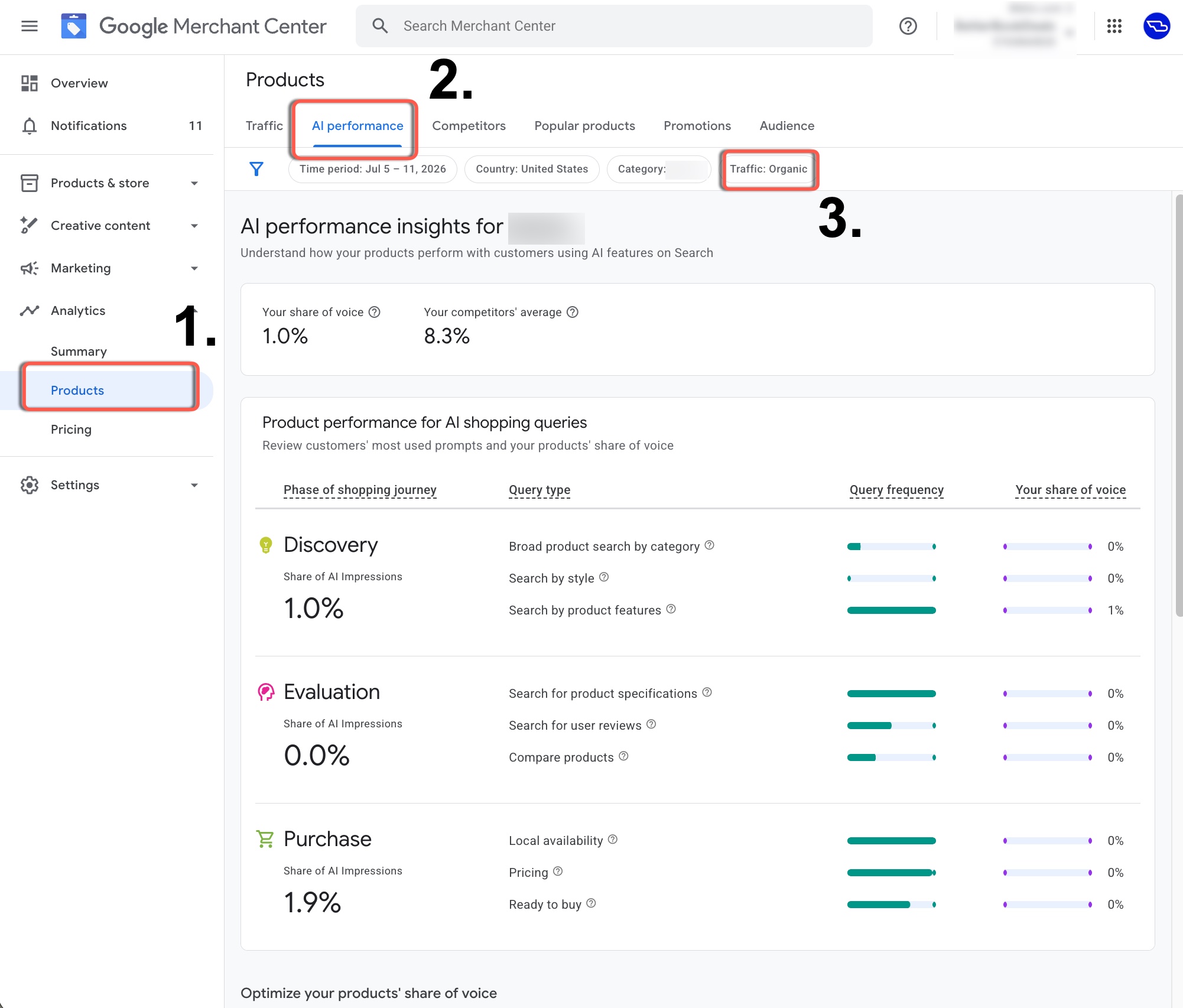
If your account is in the pilot, the path is short. Log into Google Merchant Center, open the Analytics tab in the left-hand navigation, choose Products, then select the AI performance tab at the top of the page. If you do not see the tab, you are not in the pilot yet. Australian, Canadian, Indian and New Zealand merchants should keep checking over the coming months as access widens.
The dashboard opens on your headline numbers and a breakdown of product performance by shopping-journey phase, with a scope filter bar across the top so you can narrow the view. There is no single all-categories view, which matters for how you read the data, more on that below.
What does the report actually measure?
The headline metric is share of voice, and Google shows it next to the number that gives it meaning: your competitors’ average. In the pilot screenshots one brand sits at 1.0% share of voice against a competitor-set average of 8.3%. That gap is the whole point of the report: the brand is being left out of AI answers its rivals are winning, and now it can see it. Here is what each metric means in practice.
- Your share of voice: your AI impressions divided by the total AI impressions across you and your competitor set for related queries. It is the slice of the AI shelf you are occupying.
- Your competitors’ average share: the same measure for your defined competitor set in Merchant Center, so you can see whether you are above or below the market standard rather than staring at a number with no context.
- Query frequency: how popular a given query type, product term, journey phase or attribute is. This is demand. It tells you where to focus, because a small share of a high-frequency query is worth more than a big share of a rare one.
- Query type: the kind of question being asked, for example searching by category, researching product specifications, or looking for reviews, independent of how far along the buyer is.
How does it split the shopping journey?
The most useful part of the report is that it does not treat all AI visibility as one lump. It buckets your share of AI impressions into three phases of the shopping journey, and shows the query types that sit inside each. That lets you see exactly where you are strong and where you vanish.
Discovery covers broad, top-of-funnel prompts: broad product search by category, search by style, search by product features. Evaluation is the research phase: searching for product specifications, searching for user reviews, comparing products. Purchase is the sharp end: local availability, pricing, and ready-to-buy intent. A brand can look healthy at Purchase and be invisible at Discovery, which tells you the AI knows you exist but is not introducing you to new shoppers. The fix for each phase is different.
Why is this a bigger deal than another dashboard?
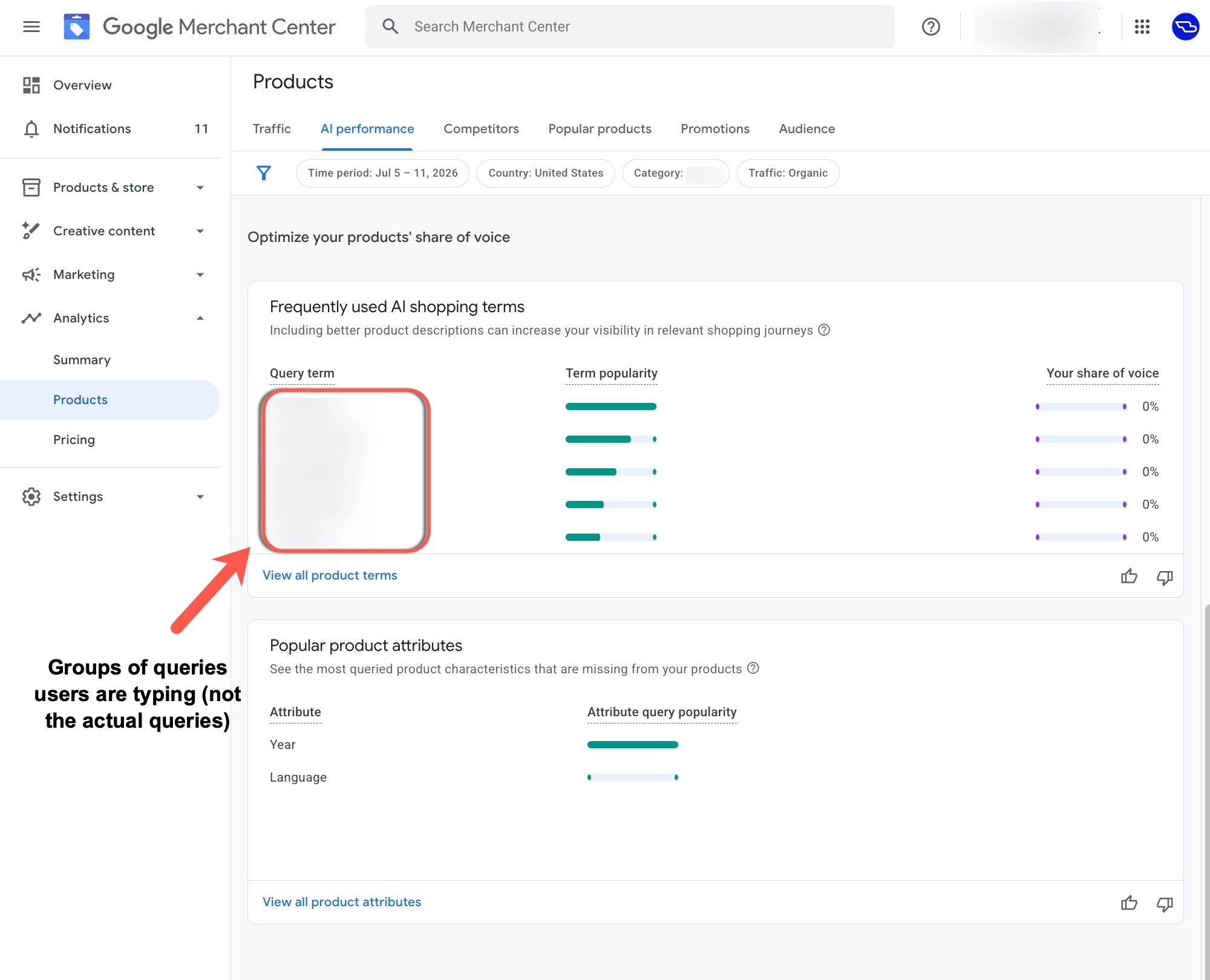
Because it confirms, from the source, that your product feed is now the raw material for AI answers. Google’s Shopping Graph, the structured layer built from Merchant Center feeds, is what grounds product mentions inside AI Mode, AI Overviews and Gemini shopping answers. The report even flags missing structured details like colour, material and style, and shows which product attributes shoppers are asking about that your data does not answer. Read plainly, that is Google telling you which gaps in your feed are costing you visibility.
This reframes the feed from a compliance chore into a growth lever. For years the goal was simply to avoid disapprovals. Now the completeness and richness of your product data directly decides whether an AI recommends you when a shopper asks for "a waterproof running shoe under $200 with good arch support." The brands that describe their products the way people actually ask for them will win the answer. The brands with thin titles and empty attributes will not be in the room.
What does the report deliberately leave out?
Read the limits as carefully as the metrics, because they shape what you can conclude. Three things are missing on purpose.
- No paid data. Traffic is "strictly limited to Organic AI traffic," meaning free listings on AI experiences. Your Shopping ads and Performance Max spend do not appear here, so this is a pure organic-visibility report.
- No clicks. The report is about impressions and share of voice, not sessions or sales. As Barry Schwartz of Search Engine Roundtable put it plainly, "Clicks? Any mention of clicks?" For now, no. You see whether you are surfaced, not what happens next.
- No all-categories roll-up. You filter to a single product category at a time. There is no view that sums every category, so brands with wide catalogues will need to check categories one by one and build their own overall picture.
What should Australian brands do before it arrives?
Australia is named in the rollout, so AU merchants have a short, useful head start: you can fix the inputs now, before the report lights up and shows you a low number. The levers are the same ones that decide whether AI recommends you, and none of them require the report to be live in your account.
Start with the feed, because that is what the report grades. Make titles read like the phrases shoppers actually say, front-load the attributes that define the product, and fill in every structured field Google offers, colour, material, size, style, gender, age group, and the category-specific ones. Then move to the surfaces the AI reads around your feed: your product pages, your reviews, and your structured data.
- Enrich product titles and descriptions with the natural-language attributes people ask for, not just the brand and model.
- Fill every relevant structured attribute in the feed. The report literally lists the ones you are missing, so treat completeness as a visibility metric.
- Invest in genuine product reviews and ratings. Evaluation-phase queries like "search for user reviews" are a distinct bucket in the report, and review-rich products earn the answer.
- Add and validate Product structured data on your site (price, availability, GTIN, reviews) so Google and other engines can read your pages cleanly.
- Define a real competitor set in Merchant Center so the "competitors’ average" benchmark is meaningful when the report opens.
How does this connect to answer-engine optimisation more broadly?
AI performance insights is Google formalising what answer-engine optimisation has argued for a while: visibility is moving from ranked links to synthesised answers, and the winners are the brands whose data is clean, complete and phrased the way real people ask. It sits alongside the generative reports Google added to Search Console and the growing weight of AI Overviews in ordinary search. The same discipline that gets you cited in an AI Overview, structured data, clear answers, genuine authority, is what earns your products a place in an AI shopping answer.
The channels are converging. What you do for your Shopify product pages, your feed, and your on-site content now pays off across Google AI Mode, AI Overviews, Gemini, and increasingly ChatGPT and Perplexity shopping too. The same well-structured catalogue earns you visibility on all of them, and most of that upside is sitting behind a Merchant Center tab that most brands have not opened yet.
The five things to remember
- Google’s new AI performance insights report shows your share of voice inside AI Mode, AI Overviews and Gemini, benchmarked against competitors.
- It is US-only in pilot now and expands to Australia, Canada, India and New Zealand in the coming months.
- It covers organic free-listing traffic only, with no paid data, no clicks, and no all-categories view.
- It flags the exact product attributes and query terms your feed is missing, so it doubles as a to-do list.
- Feed quality is now AI visibility. Fix titles, attributes, reviews and structured data before the report reaches your account.
Your next step
Get recommended by people as well as machines
AI answers lean on the sites that already review and compare products. Affiliate partners are those sites. Enter your website and get a free plan with commission rates, a partner shortlist and a 12-month roadmap.